Big facilities love arrow signs, and visitors still get lost because arrows only answer the next ten feet. Wayfinding map signage for large facilities fixes the bigger problem, it shows where you are, what else exists, and how the place is organized.
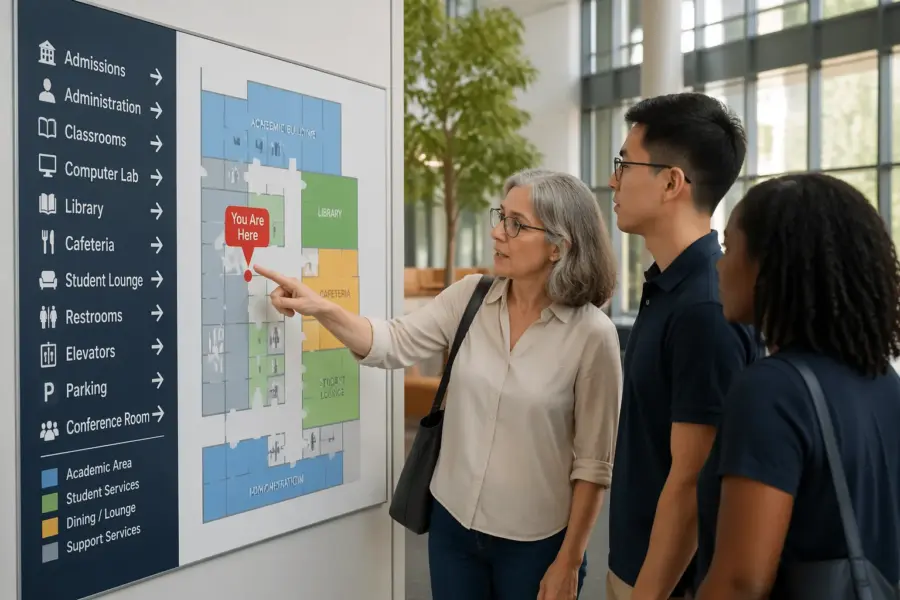
A good “you are here map” is less like a poster and more like a fast decision tool. People glance, pick a route, and move, so the board has to work in under ten seconds.
I have watched smart adults freeze in hospital lobbies and convention centers because the signage system never gives them a mental model. A clear site navigation map gives that model, and it keeps staff from playing human GPS all day.
This article focuses on practical rules that make maps readable at a distance and trustworthy up close. If you manage a campus, airport, stadium, warehouse, or medical complex, these rules save time and complaints.
When a map helps more than another arrow sign
Arrow signs work when the path is simple and the destination is obvious, like “Restrooms” down one corridor. They fail when the visitor needs to choose between multiple wings, levels, or buildings before they even start walking.
In large facilities, people often ask two questions at once, where am I and what is near me. Wayfinding map signage for large facilities answers both, while an arrow only answers the second question and usually too late.
A facility directory board is great for listing tenants and departments, but lists do not show distance or obstacles. When you pair the directory with a “you are here map,” the visitor can translate a name into a route.
Maps also reduce backtracking, which is the quiet killer of visitor satisfaction. If your lobby staff hears, “I think I walked past it,” you need a map at the decision point, not more arrows deeper inside.
A map helps most when the facility has repeating patterns that look identical, like three elevator banks, four similar courtyards, or corridors that loop. In those spaces, people cannot tell whether they are progressing or just walking in circles.
Maps also outperform arrows when the visitor is planning a multi stop trip, like parking to check in to lab to imaging to pharmacy. An arrow can only point to one thing, but a map can show the whole chain so the person can group stops efficiently.
Another time a map wins is when the destination name is not intuitive, like “Outpatient Pavilion C” or “Dock 14.” A map gives context so the visitor can connect the label to a physical place and not just a word on a sign.
Maps also help when you have multiple acceptable routes, like a fast route and an accessible route. An arrow cannot explain tradeoffs, but a map can show ramps, elevators, and the longer path that avoids stairs.
Think about the first time someone arrives at your site, because that is when your system gets judged. If the first sign they see is a list of departments with no spatial cue, they start the visit already uncertain.
A map at the entrance is also a subtle statement that the facility is navigable. People relax when they see a clear overview, even if they never read every label.
Arrow signs still matter, but they should confirm a decision that was made earlier. The map is where the decision happens, and the arrows are the reassurance along the way.
What to include: landmarks, zones, and primary routes
Start with the destinations people ask for every day, like admissions, security, shipping and receiving, elevators, and main restrooms. If you try to map everything, you will end up with a gray blob that nobody can parse.
Landmarks beat room numbers because visitors remember shapes and functions. Put the café, information desk, sculpture, loading docks, and shuttle stop on the site navigation map even if they are not formal destinations.
Zones do the heavy lifting in big footprints, and I prefer them over long hallway names. Color code wings like North Clinic, South Clinic, and Imaging, then keep that color consistent on wall signs and door plates.
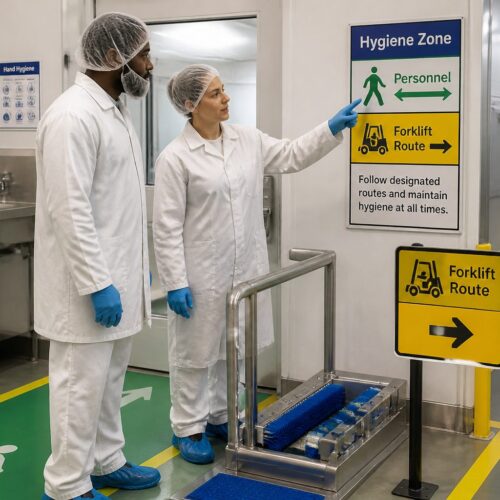
Primary routes should read like a transit diagram, with a few thick lines that show the main corridors and connectors. If a route requires a badge door, a staff only corridor, or a freight elevator, mark that clearly so visitors do not learn it the hard way.
Include the things that change a route choice, like security checkpoints, reception desks, and controlled access doors. People do not mind walking, but they hate walking toward a locked door with no warning.
Outdoor campuses need exterior cues as much as interior ones, like building letters, courtyard names, and major paths. If the map only works once you are inside, you have already lost the parking lot audience.
For hospitals and airports, include service functions that visitors use under stress, like patient drop off, baggage claim, and emergency. Stress makes people miss details, so the map should reduce choices and highlight the obvious path.
If you have multiple entrances, label them like real destinations, not like architectural notes. People will remember “Main Entrance” and “East Entrance,” but they will not remember “Vestibule 3.”
Show vertical circulation clearly, because floors are where confusion multiplies. Elevators, stairs, escalators, and ramps should be easy to spot and easy to compare.
Include a simple sense of distance, either with a scale bar, walking times, or both. Visitors make better choices when they can see that Building D is a five minute walk, not a quick dash.
If you use abbreviations, make them obvious and consistent, and do not invent new ones for the map. The fastest way to break trust is to label “Conference Center” as “CC” on the map and “Conv Ctr” on the wall signs.
Leave out details that do not affect navigation, like furniture layouts, decorative walls, and minor storage rooms. The map is not a blueprint, it is a tool for choosing a route.
Finally, make sure the map matches the real world hierarchy, with major destinations visually louder than minor ones. If every label is the same weight, the visitor cannot tell what matters.
Orientation rules: aligning the map to the viewer’s direction
Most map boards fail because north is up, but the viewer is facing east, and their brain has to rotate everything. In public spaces, you want “heads up” mapping, where the top of the map matches the direction the person is looking.
That means the same building can need different map rotations at different entrances. Wayfinding map signage for large facilities works best when you treat each board as a local tool, not a single universal graphic pasted everywhere.
Orientation is not just a preference, it is a speed boost. When the map aligns to the viewer, they can point at the board and then point into the space without doing mental gymnastics.
Heads up mapping also reduces the classic left right error, where people turn the opposite direction because the map is rotated. That one mistake can cost ten minutes in a complex with long corridors and restricted doors.
If you must keep north up for technical reasons, add a big “Facing this way” cue and a clear arrow that shows the viewer direction. Even then, expect slower comprehension and more staff interruptions.
Be careful with mirrored layouts, like two identical wings on either side of a central lobby. A rotated map can make the wings feel swapped, so label the zones boldly and add a clear central anchor point.
For multi level buildings, make orientation consistent between floors, so the user does not have to relearn the graphic language. If Floor 2 is heads up and Floor 3 is north up, you are asking for confusion.
Use the same orientation logic on digital kiosks and printed boards, because people move between them. If the kiosk rotates but the wall map does not, the user will assume one of them is wrong.
Also consider the physical stance of the viewer, because people rarely stand perfectly centered. If the board is in a corner, the average person will approach from one side, so test readability from that angle.
Orientation should also match the route confirmation signs that follow. If the map says “straight ahead” but the next sign is mounted on a wall that implies a right turn, the system feels inconsistent.
| Viewer situation | Map orientation choice | What to print on the board |
|---|---|---|
| Main entrance facing parking | Top of map points toward the lobby interior | “You are here” plus a large forward arrow labeled “This way” |
| Elevator lobby on upper floors | Top of map points toward the elevator doors opening direction | Floor number, elevator bank name, and nearest exits |
| Campus shuttle stop | Top of map points toward the primary pedestrian path | Walking times to key buildings and accessible routes |
| Corridor crossroads with four options | Top of map points straight down the corridor the viewer faces | Cardinal cue like “Facing East” and a simple intersection diagram |
When you install the board, verify the rotation in the real space, not just on a plan. I have seen maps rotated correctly in the file and then mounted on the wrong wall during a rushed install.
If the facility is large enough, create an orientation checklist for each location. Treat it like commissioning, because a single wrong rotation can poison trust across the whole system.
Symbol legends and naming conventions for quick scans
A legend is not decoration, it is a promise that symbols mean the same thing everywhere. If one board uses a cup icon for café and another uses a fork and knife, visitors lose trust fast.
Use simple, standard pictograms where you can, especially for restrooms, elevators, stairs, exits, first aid, and accessible routes. For an international audience, icons reduce language load, but only if you keep them consistent across your facility directory board and map signs.
Naming conventions should match what people hear at the front desk and see on appointment letters. If your staff says “Imaging,” do not label the map “Radiology Services Suite,” because visitors will assume they are different places.
Keep labels short and place them so they do not touch route lines or boundaries. If you need long names, put the short name on the map and the full legal name in the directory list beside it.
Decide early whether you are using numbers, letters, or names for buildings, and then stick to it everywhere. Mixing “Building A” with “Tower 2” and “West Pavilion” can work, but only if it is intentional and explained.
Use the same capitalization and punctuation rules across all signs, because small differences read like different entities. Visitors notice when one sign says “Outpatient Lab” and another says “Outpatient lab,” and they start second guessing.
Avoid internal acronyms unless they are already public facing. If your staff says “MOB” but patients never do, the map should say “Medical Office Building” and not assume insider language.
Legends should be compact, but they should not be hidden in a corner with tiny text. People will glance at the legend only if they can spot it quickly and decode it without leaning in.
Keep the symbol set small, because too many icons create a second language that the visitor has to learn. If you need special symbols for a few things, group them under a clear label like “Services” or “Accessibility.”
Use line styles consistently, like solid for public routes and dashed for staff only or restricted paths. If you change line meaning from one map to another, you force visitors to relearn the system at every board.
Be careful with color alone as a code, because color blindness and poor lighting can flatten your design. Pair color with text labels or patterns so zones still work in grayscale.
If your facility serves multiple languages, do not cram translations into every label. Use icons and short primary labels, then add a secondary language line only for the most critical destinations.
Finally, make sure the map naming matches the directory naming exactly, including suite numbers when they matter. The moment someone sees a mismatch, they assume the map is outdated even if it is not.
Where to install maps: entrances, crossroads, and visitor areas
Maps belong where decisions happen, not where people are already committed to a path. The best spots are main entrances, elevator lobbies, skybridge landings, and the first major intersection after security.
If you can only afford a few boards, put them at the places with the highest confusion rate. Watch foot traffic for a day, and you will see the same hesitation points, people stop, look around, then walk back.
Visitor areas need maps even when staff is nearby, because people do not want to ask for help every time. A “you are here map” near waiting rooms, cafés, and conference pre function spaces cuts down on late arrivals.
Do not hide the board behind planters, brochure racks, or open doors. If the map is not visible from ten to fifteen feet away, it becomes wall art for people who already know where they are going.
Install maps at the transition points where people switch modes, like parking to lobby, lobby to elevator, and elevator to corridor. Those are the moments when visitors naturally pause and look for confirmation.
In campuses, put a map where pedestrians first step onto the main path network, not just at the vehicle entrance. Drivers become walkers, and that is where orientation resets.
In stadiums and arenas, maps belong at gate entries and concourse splits, because fans arrive in waves and cannot stop in narrow corridors. A board that works for one person should still work when ten people are reading it at once.
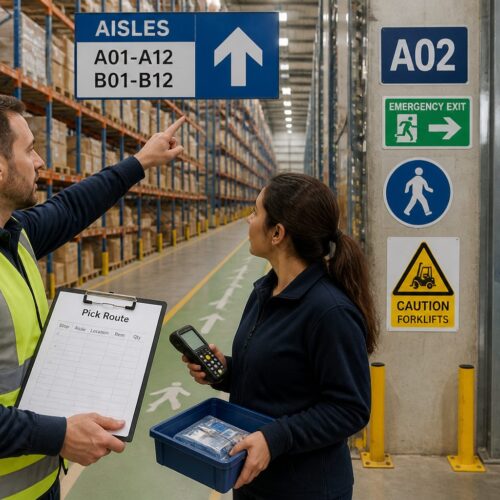
In warehouses and industrial sites with visitor check in, place a map right after the badge handoff. That is when the visitor has permission to move, and it is the best time to show the allowed routes.
Consider sightlines and lighting before you commit to a location. A perfect spot on the plan can become useless if it sits in shadow or competes with a bright digital ad wall.
Do not place a map where a queue will block it, like directly behind a reception line. If people cannot reach the board without cutting in front of others, they will not use it.
For long corridors, add smaller confirmation maps or mini nodes at midpoints, especially near elevator banks and stair cores. People feel better when they can confirm progress without walking back to the main lobby.
Outdoor maps should be sheltered and readable in rain and glare. If the board is soaked, fogged, or sun washed, it might as well not exist.
Finally, coordinate map placement with other signage so the system feels intentional. A map next to a directory, next to a directional sign, creates a clear information stack that people understand instantly.
Keeping maps current: versioning and change notifications
An out of date map is worse than no map, because it sends people confidently in the wrong direction. Large facilities change constantly, with tenant turnover, construction phases, and temporary closures that break routes.
Print a version code and date on every board, small but readable up close. When someone reports a problem, you can confirm whether they read Map v3.2 or an older panel that never got swapped.
Plan for change notifications that do not require a full reprint, like a reserved strip for temporary notices. If a corridor closes, a simple “Route closed, use Corridor B” note placed where the route starts prevents a lot of angry detours.
Digital screens can help, but only if you manage them like safety equipment with owners and checklists. A dead screen at an entrance makes the whole wayfinding system look neglected, and people start ignoring other signs too.
Assign ownership for map content, because “everyone” usually means no one. One person or team should control the source files and the approval process for updates.
Keep a master inventory of every installed board, including location, orientation, and the current version number. Without an inventory, updates turn into a scavenger hunt where one outdated panel survives for years.
Create a simple change log that records what changed and why, even if it is just a shared spreadsheet. When visitors complain, the log helps you connect the complaint to a recent move, rename, or closure.
Renaming is a special kind of update, because it breaks old habits and old directions. If you rename a wing, consider a temporary dual label like “Imaging (formerly Radiology)” for a few months.
Construction phasing needs its own map strategy, because the “truth” changes every few weeks. In those periods, it can be smarter to simplify the map and highlight only open public routes.
When you add temporary notices, make sure they look official and are placed consistently. Handwritten paper taped to a polished board reads like an emergency and makes people doubt the rest of the system.
For digital maps, test the update workflow end to end, from content edit to on screen display. The biggest failure is not the screen itself, it is the process that leaves old content running after a change.
Also plan for the day when a digital kiosk is offline, because that day will come. The physical wayfinding map signage for large facilities should still carry the core navigation load without relying on a network connection.
Finally, schedule periodic audits, even when nothing seems to be changing. A quarterly walk through with fresh eyes catches small drift, like a relocated clinic nameplate that no longer matches the map.
Material, size, and readability standards for busy environments
Map boards live in harsh conditions, fingerprints, glare, cleaning chemicals, and the occasional luggage hit. Choose materials that tolerate daily wipe downs and keep contrast high under mixed lighting.
Text size should match viewing distance, and many facilities print far too small because the designer worked on a laptop. If people stand six feet away, you need large type for zone names and a bolder “You are here” marker than you think feels tasteful.
Use matte finishes where you can, because glossy panels turn into mirrors near windows. If you must use glass, angle the board slightly and test it at the exact time of day when sun hits the lobby.
Mounting height matters for accessibility and for crowds, and I like a layout where the key area sits around chest height. Keep the lower portion clear enough for wheelchair users, and keep the top portion simple enough to read over shoulders in a line.
Busy environments also need impact resistance, because people bump boards with strollers, carts, and rolling bags. A cracked panel looks minor, but it signals neglect and makes the information feel less reliable.
Choose fonts that stay legible under quick glances and imperfect eyesight. Thin modern typefaces can look elegant in a mockup and disappear completely under real lobby lighting.
Contrast is a real accessibility issue, not just a design choice. Light gray text on a white background may look clean, but it fails for older visitors and anyone in a hurry.
Keep the map graphic simple enough that it survives printing variations. If your design depends on subtle color differences, it will break when a replacement panel is printed at a different shop.
Size should reflect the complexity of the environment, not the available wall space. A tiny map in a complex facility forces micro text, and micro text forces people to crowd the board.
Consider adding a secondary smaller map for quick overview and a larger inset for the immediate area. That combination helps both the person planning a long walk and the person just trying to find the nearest elevator.
Lighting around the board matters as much as the board itself. A well lit map with no glare beats a larger map that sits in shadow.
In places with frequent cleaning, like hospitals, test the surface with the actual chemicals used by housekeeping. Some coatings haze over time, and haze kills contrast and readability.
Finally, treat the map board as part of the architecture, not an afterthought. A sturdy frame, clean mounting, and consistent placement make people more likely to trust what they are reading.
Designing the “you are here” marker so people notice it
The “you are here map” marker has one job, it must jump off the board instantly. I prefer a bold shape like a circle with a pointer, paired with a contrasting color that is not used anywhere else on the map.
Place the marker exactly where the board is installed, not where it would look nicer for composition. If the board sits on the east wall of a lobby, the marker should sit on that wall edge, even if it crowds a label.
Add a clear facing direction indicator, because people need to translate the map into a first step. Without that cue, they can know where they are and still not know which way to turn.
Make the marker label readable at the same distance as the main zone names. If “You are here” is tiny, people waste time searching for it and assume the board is not meant for them.
Do not let the marker get buried under other highlights, like emergency routes, tenant callouts, or promotional overlays. The marker should be the first thing the eye lands on, not the fifth.
Use the marker to anchor nearby information, like “Nearest restrooms” or “Nearest elevators.” People often need an immediate next step before they plan the longer route.
If the location is complex, include a small inset around the marker that simplifies the immediate intersection. That inset prevents the common problem where the big map is clear but the first thirty feet are confusing.
Be consistent with the marker style across all boards, because visitors learn it quickly. Once they recognize the symbol, they can scan any map faster.
Also consider tactile and accessibility needs, especially in public facilities. A raised marker or a Braille note near the map can help, but it should be integrated cleanly and not feel like an afterthought.
- High contrast “You are here” label
- Pointer showing viewer facing direction
- Immediate area inset for complex intersections
- Nearest elevator and stair icons
- Accessible route indicator from current spot
- Walking time to top destinations
Walking time estimates work best when they are conservative and based on real paths, not straight line distance. If you promise three minutes and it takes eight, people will blame the map, not their pace.
If you show multiple routes, make the recommended one obvious and keep alternates visually quieter. Too many equal weight options can freeze a person who only wants the simplest path.
Testing: timing a route using only the map and signs
If you want to know whether your wayfinding map signage for large facilities works, run a simple timed test. Pick common destinations, hand a tester the map only, and tell them to follow posted signs without asking staff.
Use testers who do not know the site, like new hires from another building or volunteers from a partner organization. Staff members unconsciously fill gaps because they already know the shortcuts and the internal names.
Time the route and record every hesitation, wrong turn, and moment where the person stops to reread. When you see repeated stalls at the same intersection, you have a sign placement problem or a naming mismatch, not a user problem.
After the walk, ask one blunt question, “What did you expect to see that you did not see.” That answer usually points straight to missing reassurance signs, unclear zone boundaries, or a facility directory board that lists a destination without showing its location.
Test both the first time visitor journey and the repeat visitor journey, because they fail in different ways. First timers need orientation and reassurance, while repeat visitors need speed and consistency.
Run tests at different times of day, because lighting, crowds, and noise change how people read. A map that works at 10 a.m. can fail at 5 p.m. when glare hits the glass and the lobby is packed.
Include at least one accessible route test, even if your facility is fully compliant on paper. The real world includes blocked ramps, heavy doors, and elevators that are hard to find without clear cues.
Watch what people do with their hands, because pointing reveals confusion. If a tester traces a line and then looks up repeatedly, the map is not giving them a confident first step.
Pay attention to language, especially when a tester says, “I think this is it.” That phrase means the system is forcing guesswork, and guesswork is what maps are supposed to eliminate.
Document the exact sign sequence a person encounters, because missing one reassurance sign can break the whole route. The map may be correct, but the path can still fail if the next directional sign is absent or hidden.
Test the directory to map handoff by asking someone to find a tenant name and then walk to it. If they can find the name but cannot find it on the map, you have a cross reference problem.
Finally, rerun the same tests after you make changes, because improvements should be measurable. When the time drops and the hesitation points disappear, you know the system is doing real work.
Conclusion
Good maps reduce stress because they give people control at the moments when they are most unsure. A strong site navigation map, paired with consistent symbols and names, turns a confusing complex into a place that feels manageable.
Build each board around real decisions, orient it to the viewer, and keep it updated like any other operational system. When your “you are here map” works, visitors stop asking for directions and start arriving on time.
Wayfinding map signage for large facilities is not about making a pretty graphic, it is about reducing friction in a real environment. The payoff shows up in fewer late appointments, fewer missed meetings, and fewer frustrated calls to the front desk.
If you treat maps as a living system with clear standards, they become one of the highest leverage tools in the building. People do not remember every sign, but they remember the feeling of moving through a place without getting lost.